Blog
Go embed example of serving static files at the root URL path
Go 1.16 introduced the embed package which allows serving static files from directly within the binary without the need for any external package.

Screenshot of the example web page Here are two example’s showing how to serve from the root URL path.
example.go shows an example of how to use the new io/fs package and the Sub func. The comments offer a word of caution however that it may not prevent access outside of the subdirectory.
Detect Visitors DNS Provider
Recently I had bought a new router and was in the process of setting it up, during that process I started looking for various DNS-over-TLS and DNS-over-HTTPS providers. That’s when I came across NextDNS, on the setup page I saw the following:
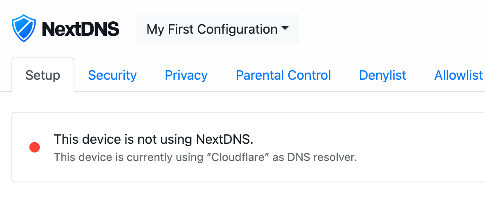
NextDNS Setup page I thought what!? How do they know that? After some investigation it all made sense, I’ll share what I found and a demo implementation.
ModuleNotFoundError: No module named 'distutils.util' on Ubuntu
If you’re using Ubuntu 16.04 or newer and want to use Python 3.7 and newer with pip you have probably seen this error message
ModuleNotFoundError: No module named 'distutils.util'.On later versions of Ubuntu the error message will be:
ModuleNotFoundError: No module named 'distutils.cmd'. This fix will still work.bmcculley@hakk:~$ pip3 Traceback (most recent call last): File "/usr/local/bin/pip3", line 5, in <module> from pip._internal.cli.main import main File "/usr/local/lib/python3.7/dist-packages/pip/_internal/cli/main.py", line 10, in <module> from pip._internal.cli.autocompletion import autocomplete File "/usr/local/lib/python3.7/dist-packages/pip/_internal/cli/autocompletion.py", line 9, in <module> from pip._internal.cli.main_parser import create_main_parser File "/usr/local/lib/python3.7/dist-packages/pip/_internal/cli/main_parser.py", line 7, in <module> from pip._internal.cli import cmdoptions File "/usr/local/lib/python3.7/dist-packages/pip/_internal/cli/cmdoptions.py", line 19, in <module> from distutils.util import strtobool ModuleNotFoundError: No module named 'distutils.util' Error in sys.excepthook: Traceback (most recent call last): File "/usr/lib/python3/dist-packages/apport_python_hook.py", line 63, in apport_excepthook from apport.fileutils import likely_packaged, get_recent_crashes File "/usr/lib/python3/dist-packages/apport/__init__.py", line 5, in <module> from apport.report import Report File "/usr/lib/python3/dist-packages/apport/report.py", line 30, in <module> import apport.fileutils File "/usr/lib/python3/dist-packages/apport/fileutils.py", line 23, in <module> from apport.packaging_impl import impl as packaging File "/usr/lib/python3/dist-packages/apport/packaging_impl.py", line 23, in <module> import apt File "/usr/lib/python3/dist-packages/apt/__init__.py", line 23, in <module> import apt_pkg ModuleNotFoundError: No module named 'apt_pkg' Original exception was: Traceback (most recent call last): File "/usr/local/bin/pip3", line 5, in <module> from pip._internal.cli.main import main File "/usr/local/lib/python3.7/dist-packages/pip/_internal/cli/main.py", line 10, in <module> from pip._internal.cli.autocompletion import autocomplete File "/usr/local/lib/python3.7/dist-packages/pip/_internal/cli/autocompletion.py", line 9, in <module> from pip._internal.cli.main_parser import create_main_parser File "/usr/local/lib/python3.7/dist-packages/pip/_internal/cli/main_parser.py", line 7, in <module> from pip._internal.cli import cmdoptions File "/usr/local/lib/python3.7/dist-packages/pip/_internal/cli/cmdoptions.py", line 19, in <module> from distutils.util import strtobool ModuleNotFoundError: No module named 'distutils.util'Solution
Don’t worry, it’s a pretty easy fix. The module not found error just means that the nessacary packages aren’t installed. To fix this, just run the following in the terminal:
How to Install Python 3.8 on Ubuntu 16.04 and 18.04
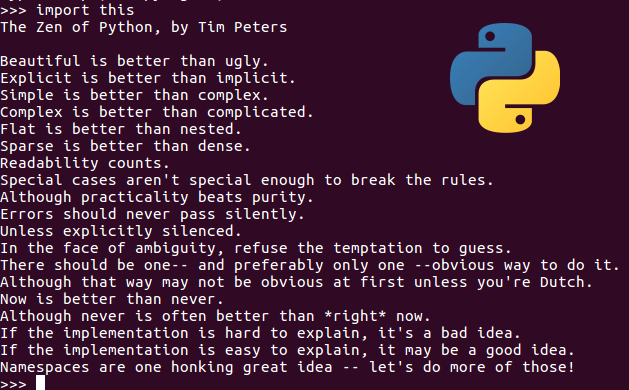
The Zen of Python Python is one of the most popular and most widely used programming languages in the world at this time. The philosophy behind the Python programming language is most likely the reason. It’s very easy to learn with its simple syntax, that same syntax makes the language very readable, therefore easy to understand what someone else wrote. From this the Python ecosystem has grown into a massive juggernaut, encompassing everything from basic scripts to web applications, to machine learning algorithms, process automation and everything in between.
How to Install Telnet on Mac [2025]
Need to use Telnet on your Mac? Only to find out at the most inopportune time that Telnet is no longer on MacOS? Well, take solace in the fact that you’re not alone. Telnet has been removed from modern versions of the system software starting from MacOS Mojave and newer. These instructions will work for MacOS Mojave and newer, including Sonoma and Sequoia (These are the steps that I have personally used to get Telnet back).
Setting up www-data for git deployment
A brief guide about setting up the www-data account so it’s able to clone and/or pull from a git repo.
This was done for GitHub, it will be a very similar process for other git hosting services, I believe.
After creating a git repo and a githook listener (I’m planning a future post for this), there are a few more steps that need to be taking before the listener will be able to pull down the new code or posts. In my particular case the githook listener was running as www-data on Ubuntu.
Generate Wildcard SSL certificate from Let’s Encrypt using Certbot
First make sure certbot is installed on your system, the instructions below assume that you’re using Ubuntu.
If you just want to create the Certificate, skip to Step 2.
Step 1: Installing Certbot
First you’ll need to add the repository:
$ sudo add-apt-repository ppa:certbot/certbotAfter that run update:
$ sudo apt-get install certbotNow that certbot is all installed, it’s time for the certificate.
Step 2: Generate The Wildcard Certificate
certbot certonly \
	--manual \
	--preferred-challenges=dns \
	--email letsencrypt@example.com \
	--server https://acme-v02.api.letsencrypt.org/directory \
	--agree-tos \
	-d *.example.com
Step 3: Verify Domain Ownership
After executing the above step, Certbot will ask you to create a DNS text record.
Ubuntu apt update/upgrade sa-compile E: Sub-process
A quick post with some notes on how to solve this issue. When running apt update and apt upgrade on Ubuntu I received this error message:
Errors were encountered while processing: sa-compile E: Sub-process /usr/bin/dpkg returned an error code (1)So I tried running
sa-compilemyself which returned the following:sa-compile: not compiling; 'spamassassin --lint' check failed!It wasn’t obvious to me at first but running
spamassassin --linthelped. It lead me to my main.cf which I had changed and never checked 😖Python One liners
A couple of helpful(?) one liners in python, I use these for quick development or when troubleshooting and testing.
Start a static file http server in the current directory
python -m http.serverIf you only want it to listen on localhost you can pass a bind parameter
python -m http.server --bind 127.0.0.1It’s also possible to specify a port (default is 8000)
python -m http.server --bind 127.0.0.1 8080If you need an smtp server for trouble shooting, it’s possible to fire one of those up in one line. It will just print all output to the terminal but most of the time that works just fine for my purposes. You my need elevated privileges to run on port 25 or any other privileged port.
Setting up MariaDB on FreeBSD
This will briefly cover building from source and some notes for some silly mistakes that I made and how to “fix” them or at least get things working. Let’s get started.
Make sure everything is up to date
Before starting anything else make sure that all ports are there and up to date.
root:~/# portsnap fetch update && portupgrade -aNote: If this is new install you might need to extract first,
portsnap extract.


